A long read · Studio & Tools · Sound
EQ draws the room, and keeps it in the room
A microphone visualiser with thirty-three displays, a recorder that tests its formats first, and no network code at all. We read its 5,206 lines and set it beside audioMotion and Friture.
By the LABS editorsTested 27 September 2026, 19:58–20:05 UTCA 4-minute read842 words
Chapter one · What it is
Seeing sound in a tab
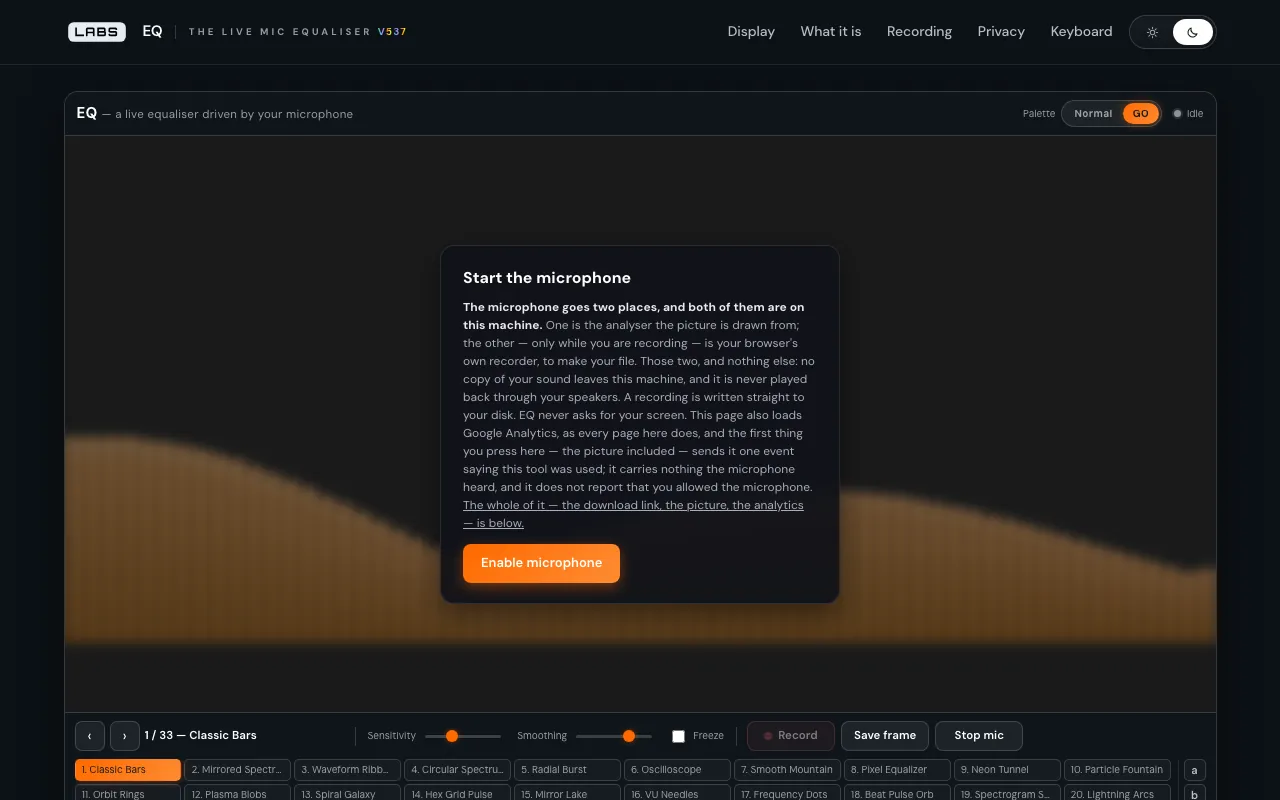
EQ is a live equaliser driven by your microphone. Allow the microphone and the sound in the room is drawn in one of thirty-three ways, from Classic Bars and a scrolling spectrogram to VU needles, Note Warp, Truchet Tiles and Rose Pens.1 You can record the picture with its sound, or the sound alone, straight to your own disk, or keep a single frame. There is no file to load and no player to learn.
It suits musicians, streamers, teachers and the curious who want to see sound — or make a visualiser clip — without installing anything, and who care where their microphone goes.
Chapter two · How it works
Raw input, and no way out
EQ is built on the Web Audio API and runs entirely in the browser. When it asks for the microphone it switches off echo cancellation, noise suppression and automatic gain — the processing browsers apply for calls — and falls back to a plain request only if that one fails.2 The picture therefore shows the room rather than a telephone filter.
The signal goes to an analyser with an FFT size of 512, and every display draws from the same frequency and waveform arrays. The analyser is never connected to the speakers, so there is no feedback loop.3
The script's header states that the file makes no fetch, XHR, beacon or worker call, and a search of the file bears that out. The page's privacy section is careful to separate what the instrument promises from what the surrounding page loads, such as analytics and a font.4
Recording uses MediaRecorder on a stream taken from the canvas. At load, each container is put to MediaRecorder.isTypeSupported(), only the formats that pass are offered, and each option notes where the file will open — MP4 on iPhone and Windows, WebM not on Apple devices. A separate sound-only menu offers m4a or WebM.5
Chapter three · The test
Reading the instrument
We loaded the page from a local copy of build 537 at 19:58:54 UTC on 27 September 2026 (41,577 bytes), then the instrument script: 251,224 bytes over 5,206 lines. We counted 33 display names and found no occurrence of fetch(, XMLHttpRequest, sendBeacon or new Worker.6
We also worked out its resolution from the source. An FFT of 512 gives 256 frequency bins; on a device running at 48 kHz each bin is 93.75 Hz wide, so the lowest spans everything from 0 to about 94 Hz. Values are 8-bit, from 0 to 255. That is plenty for a lively picture, and coarse for measurement.
Chapter four · Against the field
audioMotion and Friture
audioMotion
Page read 27 September 2026, 20:03 UTC, via its project README
audioMotion is a media player and high-resolution spectrum analyser that runs as a browser app, taking local files, M3U playlists or the microphone. Its project README lists logarithmic, linear, Bark and Mel scales, up to 240 bands including octave bands, decibel or linear amplitude, and A, B, C, D and ITU-R 468 weighting; it is AGPL-licensed and asks for a Chromium-based browser.
Where it is betterIt plays and analyses your music files, not only the microphone, and offers measurement-grade scales, bands and weighting. It is open source.
Where EQ goes furtherIt records picture and sound to a format your browser has proved it can write, and says where the file will open; and it is written for any browser with Web Audio, with a fallback for older Safari, rather than for Chromium alone.7
Friture
Page read 27 September 2026, 20:03 UTC
Friture is a free, open-source real-time audio analyser for Windows, macOS and Linux, with a spectrum analyser, a rolling spectrogram, a fraction-of-octave analyser, a scope, a pitch tracker, a delay estimator and a signal generator.
Where it is betterThese are real analysis tools, and the test-signal generator is something EQ does not have.
Where EQ goes furtherIt asks you to install nothing, offers thirty-three designed displays, and records to MP4 or WebM for sharing.
Chapter five · Where it falls short
A picture, not a meter
EQ listens only to the microphone. There is no file input anywhere on the page, so you cannot visualise a song file directly, which audioMotion does.
It is not a measuring instrument: 256 bins of roughly 94 Hz, 8-bit values, no calibrated decibel axis, no weighting filters and no pitch tracker. For measurement, audioMotion and Friture are the tools.
There is also a small gap between word and code. The file's header says the only thing it stores is your palette name, but it also stores the recording mode under eq.recMode.8
Chapter six · The verdict
Careful with the one thing it asks for
EQ spends its care on the microphone. It asks for the unprocessed signal, never plays it back, contains no network code, and offers only the recording formats it has tested. Its thirty-three displays make that signal a pleasure to watch.
For seeing sound, and for a clip that stays yours, it is a fine instrument. For measuring sound, go to Friture or audioMotion.
An instrument for watching sound that never lets the sound leave.
Notes on the evidence
Paths are in the labs.llc build 537 tree; times are UTC on 27 September 2026.
eq/assets/js/eq.jsdisplay names, lines 656–2804;eq/index.htmlline 406.eq.jslines 3325–3331; fallback at line 3333.eq.jslines 3340–3347; header lines 16–19.eq.jsheader lines 8–13; the search for network calls found nothing.eq.jslines 3755–3800 (candidates and notes), 3857 and 3883–3893 (sound only).- Page and script at 19:58:54 UTC; resolution worked out at 20:05 UTC from line 3341.
eq.jslines 3313–3336 (feature check, constraints,webkitAudioContextfallback).eq.jsheader lines 19–20, against line 4793.